A pocket interpreter for a live conversation — at the doctor, at the town hall, at the bank, at work. You say your sentence, you stop, and the phone speaks the translation to the other person. Then the other way round. There is no "who is speaking" button: the language is recognised on its own.
Open the translator How it works Android & iPhone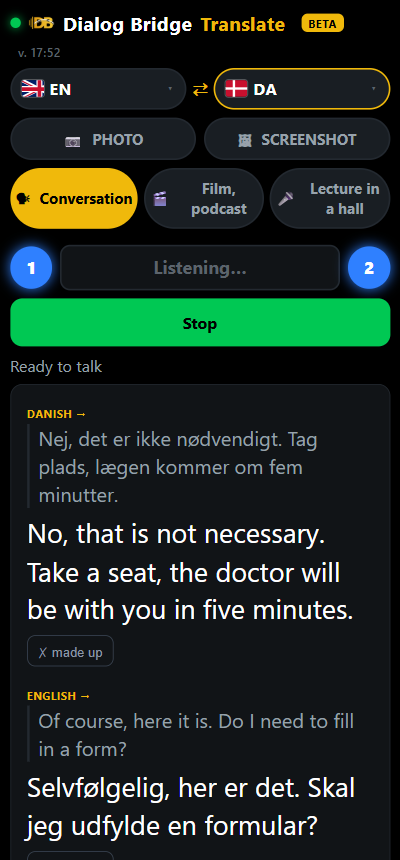
The doctor or the official waits while you hold the phone and type. The conversation turns into written correspondence.
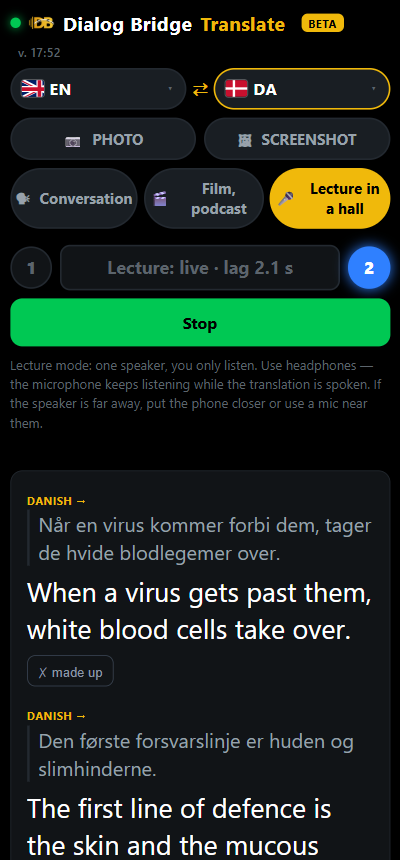
Simultaneous programs run after the speaker and drop pieces to catch up. A human interpreter does not do that — they listen to the sentence through to the end.
A paper from the town hall, a bill, the instructions for a medicine. Typing the text by hand is slow and full of mistakes.
Three steps, nothing to install.
It is an ordinary page in the browser. You can add an icon to the home screen — then it works like an app.
Yours and the other person's. After that the phone lies on the table with the screen facing them — both the original and the translation are visible there.
Say your sentence, then stop. A moment later the translation is spoken. A short "yes" or "no" is translated almost at once; a long thought is heard through to the end.
Six habits that remove almost every complaint. Tested in real conversations.
After you open the page, do not start speaking straight away. At that moment the translator is listening to the silence and learning how this particular place sounds: the hum of the air conditioning, the street outside, other people talking. That is how it later tells noise from your voice. Speak in the very first second and the first sentence will almost certainly come out as a mess.
Without them the phone hears the translator's own voice from the speaker and takes it for a new sentence. In lecture mode headphones are mandatory; in a normal conversation it is simply noticeably cleaner.
Say the thought, then go quiet. The pause is the command "translate". Half a word gives it nothing to work from: it will guess by the sound and miss.
During that time the microphone is deliberately deaf, so the translator does not hear itself. Anything said on top of the translation is not lost in the literal sense — it is simply not heard.
Above every translation you can see which words it made out. If there is nonsense there, the translation is not to blame — the hearing is: move closer to the phone or remove the source of noise. The translation honestly translates what it heard.
The slider says how many times louder than the room your voice has to be. The mark on the scale shows the live boundary: stay silent and the bar is below the mark, speak and it goes above. In a cafe or on the street a couple of steps is enough.

One translator on every device: the same languages and the same settings. It opens in its own window with its own icon.
A ready app file. The phone will ask for permission to install an app from outside Google Play — that is normal, allow it once.
Download for Android Or open in ChromeApple lets apps in only through the App Store, so on iPhone the translator is added to the home screen from Safari — it then opens full screen, like any app.
Works in Chrome, Edge or Safari. In Chrome and Edge the install icon in the address bar puts it on the desktop as a separate program.
Open in the browserAll of this already works, it is not a plan.
The direction of translation is decided by the meaning of what was said, not by the letters and not by a button. The other person can switch to English in the middle of a sentence — the translation will not stumble.
A video, the news or an audiobook: the translator listens without stopping, cuts the speech into short pieces and reads the translation a little faster so it keeps up with the picture.
One speaker — a teacher, a doctor, a guide. Only their voice is translated, the rest of the room is ignored. The screen shows how far the translation lags behind, in seconds. Use headphones.
Lamps 1 and 2 light up when the translator has caught your voice and the other person's voice. Wrong person caught? One button resets voice 2 and it listens again.
Photograph a letter, a bill, a sign — or pick a screenshot from the gallery. The text is read and translated into your language, and you can listen to it out loud. A blank or blurred photo is reported honestly, nothing is invented.
The translation starts sounding from the first sentence while the rest is still being prepared, and the next phrase is translated while the current one is playing. «Yes» and «no» come almost instantly.
Under every phrase there is a «made up» button. Press it and this phantom phrase is never translated again. Noise, single stray words and the translator's own echo are filtered out automatically.
You keep your headphones on, and the other person hears the translation from the phone speaker — a switch in the settings for a person without headphones.
Put the phone in your pocket or turn the screen off — the translation goes on. A beep marks the start and end of the session, two beeps mean your turn is up and it is translating.
The first half-minute it listens to the room and learns its noise. Sensitivity, the longest turn and the pause before translating are set with sliders; each slider says which mode it belongs to.
Buttons and hints switch to your language by themselves. The other person sees both the original and the translation, with the language marked.
Show the QR code — the other person points the camera and has the translator on their own phone in a second.
The idea is this: a small fixed fee for access plus tokens for the talking you actually do. Tokens are spent only when you really speak or translate a photo — silence costs nothing.
No, it works right in the browser. For Android there is a ready app file, on iPhone it is added to the home screen from Safari — see «Get the app» above.
No, a connection is needed: recognition and translation are computed on the server. An ordinary mobile connection is enough.
A live voice from the phone's speaker. You can turn the screen towards them — the text is there in their language.
Photographs are not stored at all — they are made smaller in the phone's memory, sent, and immediately forgotten. Keys are kept only on the server and never reach the browser.
Simultaneous translation runs alongside the speaker and, as it falls behind, drops pieces. Here the sentence is heard in full and spoken to the end — the way a human interpreter works.
That is exactly what it was made for. Put the phone between you and the other person and take turns speaking.
It opens in the browser in a second — or take the app for Android and iPhone.
Open the translator Android & iPhone Dialog Bridge